
Modern tools for traditional dairies

Run your milk route from your phone.

Milk Jar keeps track of who gets milk, when they get it, what they owe, and which jars they still have. It’s made for small dairies that deliver to their own customers.

Built for iPhone Built for Android Offline-first
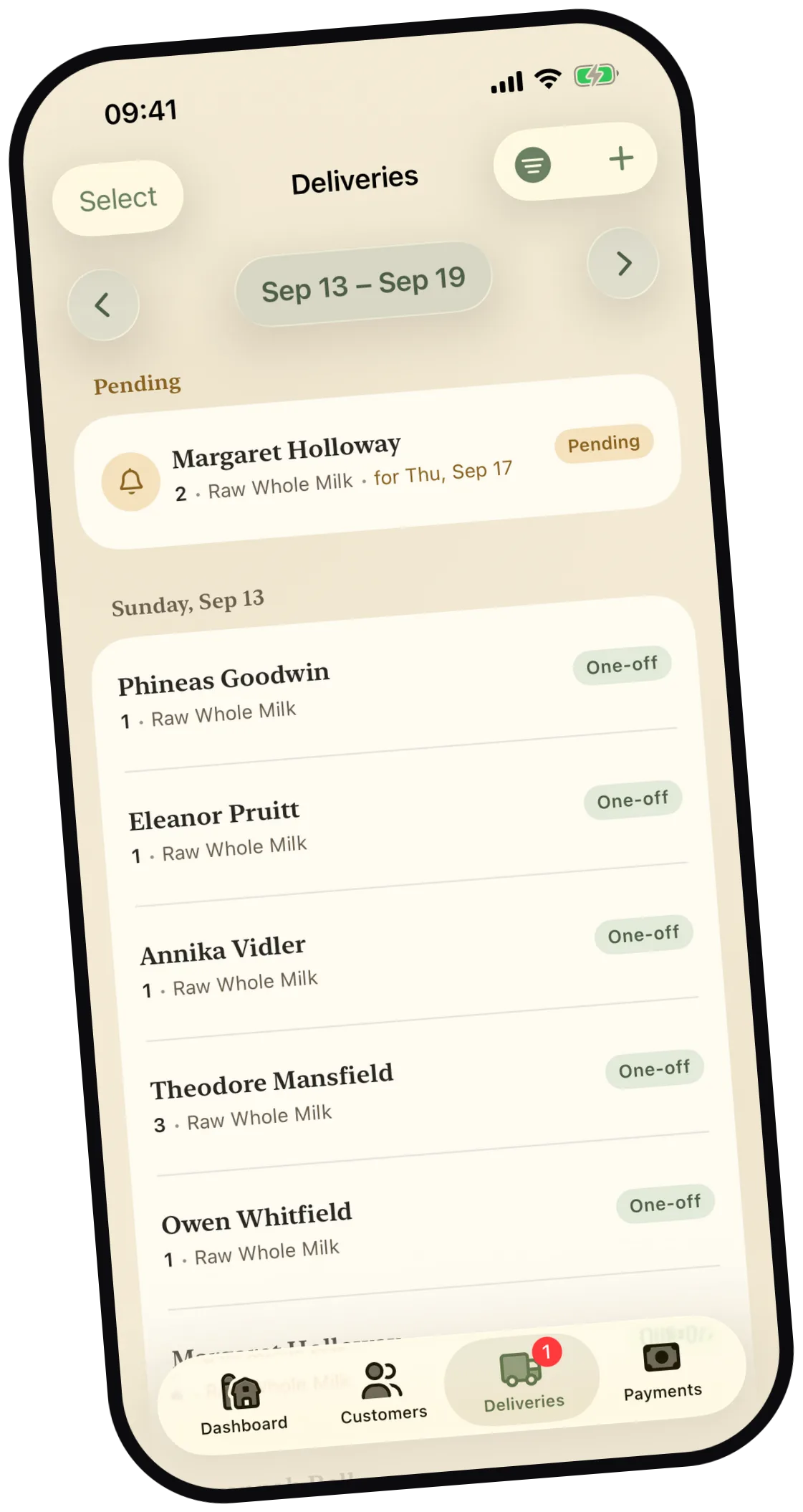
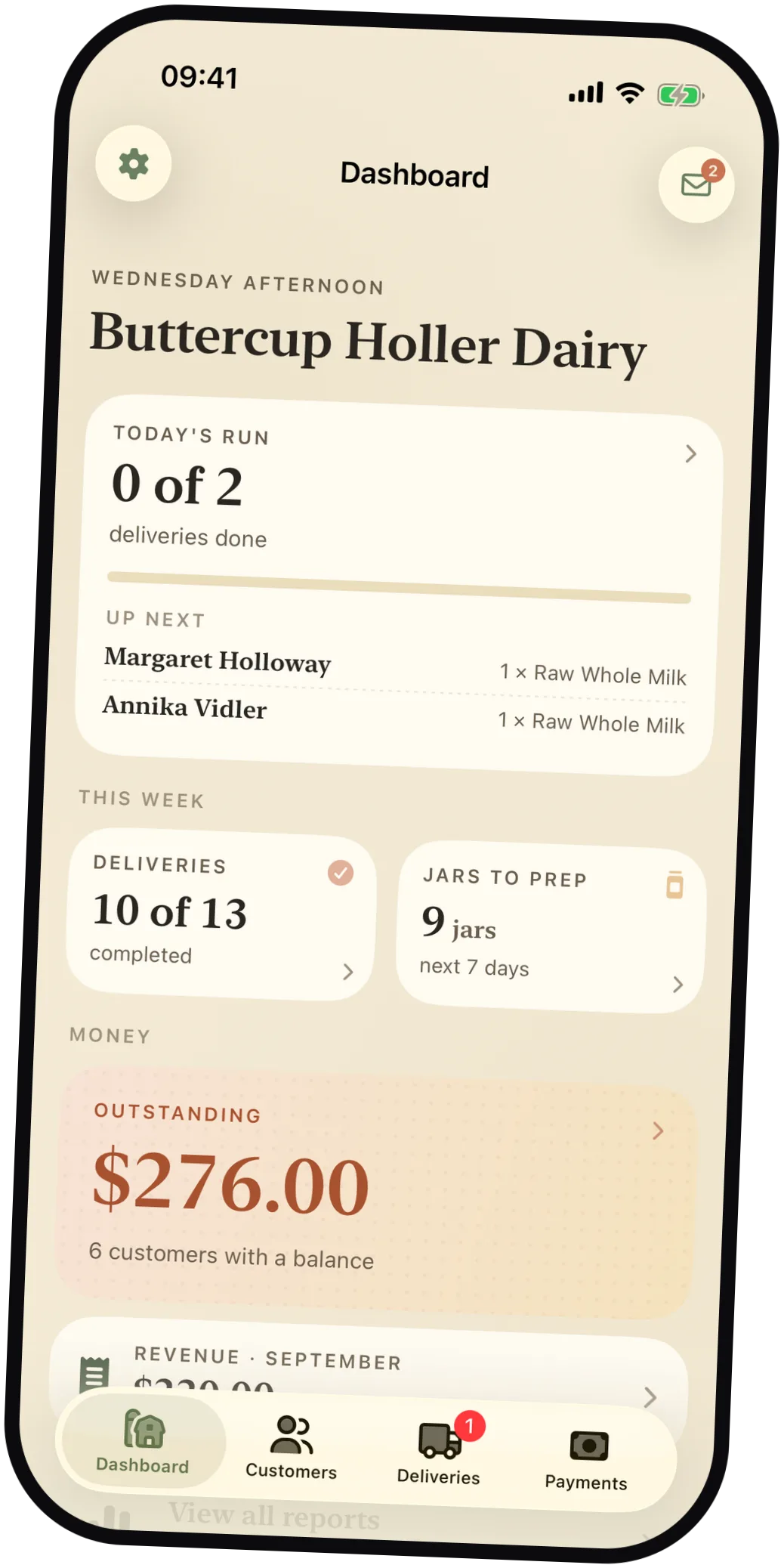
Milk Jar deliveries screen showing the week's route Milk Jar dashboard for Buttercup Holler Dairy showing today's run, deliveries, jars to prep, and outstanding balance A friendly illustrated cow waving

It replaces the group text, the notebook, and the spreadsheet.

Sound familiar?

Every delivery week starts with two chores.

First you find out who wants milk and how much. Then you work out how many jars to fill. Milk Jar does both.

The old way

Texting every customer, every week.

“Milk this week? How many?” You send it thirty times, the answers trickle in over three days, and you scroll back through the thread to add them up.

With Milk Jar

Milk Jar asks for you.

The day before each delivery, customers get a reminder. They tap to confirm, skip, or change the amount. If they don’t answer, you deliver the usual order, so the only replies you have to deal with are the changes.

Day-before reminders · Milk Jar Pro

The old way

Counting jars off a notepad.

The standing orders are in your head and the changes are somewhere in your texts. So before every run you count again to find out how many jars to wash and fill.

With Milk Jar

The count is already done.

Milk Jar adds up the standing orders for you. The home screen shows how many jars you need this week, and the prep list breaks that down by day: how many jars, then who gets what.

Week-ahead prep list · works offline

What it handles

Everything that happens on a delivery day.

A delivery changes three things at once: what the customer got, which jars are out, and what they owe. Milk Jar records all of it in one step.

01

Run the route

See today’s stops, mark each one delivered with a tap, and add a one-off order when someone wants extra.

Weekly + biweekly schedules
02

Keep jars moving

When you record a delivery, you also record the jars you dropped off and the empties you picked up. Milk Jar keeps the jar count and the deposit for each customer.

Jar deposits + returns
03

Know what’s owed

Record a payment as cash, check, or digital. Milk and jar deposits are kept as separate balances, and you can make a PDF receipt when a customer asks for one.

Payments + PDF receipts
04

Plan the week

Reports show revenue, milk volume, missed deliveries, and who still owes you. The prep list tells you how many jars to fill for each day coming up.

Reports built for operators
05

Chat with your customers

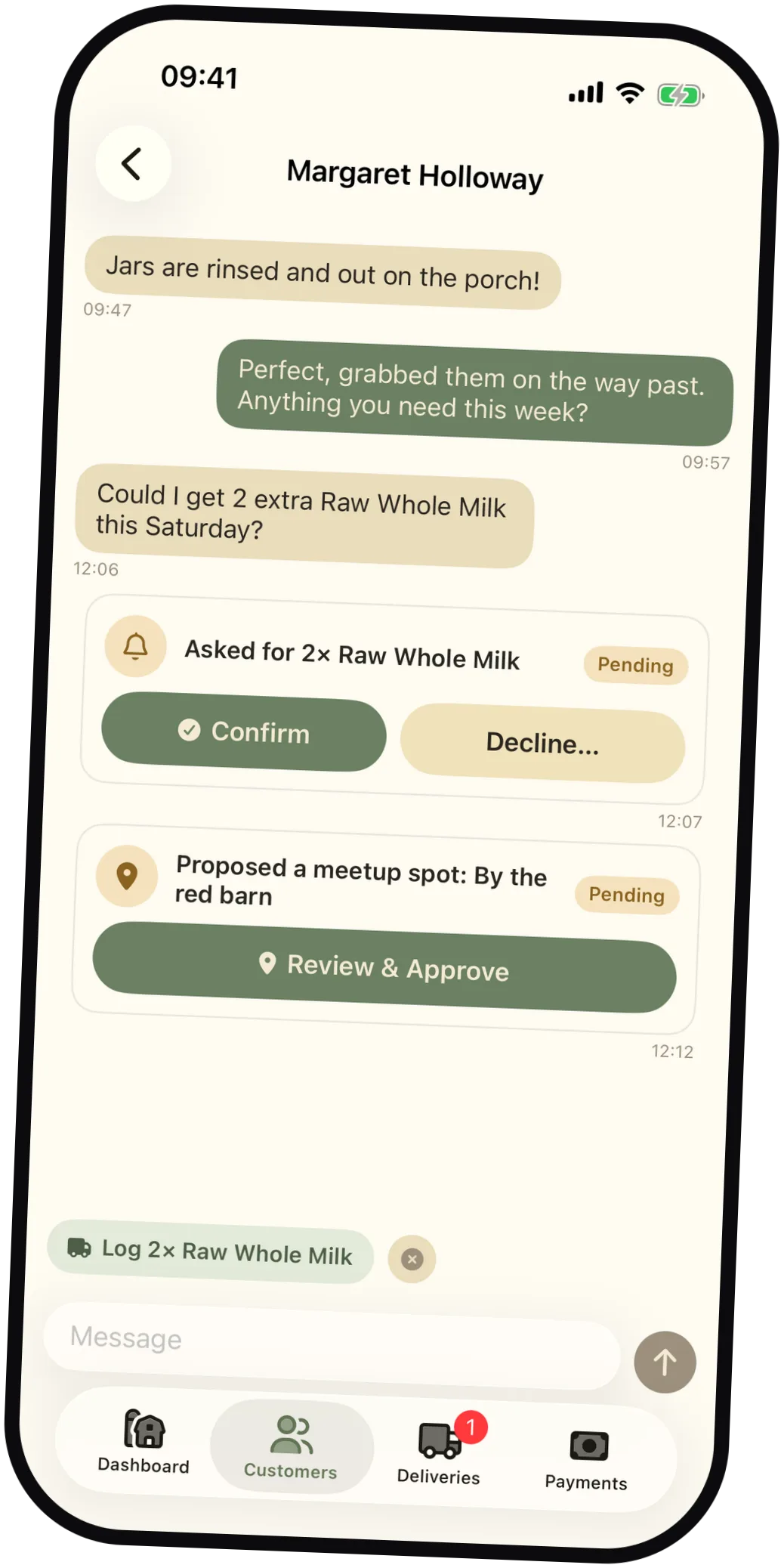
Message one customer, or everyone on the route at once. When a customer asks for a delivery or suggests a meetup spot, it shows up in the chat with a button to approve it. If someone writes “two extra Saturday?”, Milk Jar offers to fill in that delivery for you.

Customer chat · Milk Jar Pro

Customer chat

Answer a customer’s request with one tap.

Delivery requests, meetup suggestions, and reminder replies all show up in your chat with that customer, so there’s no second inbox to check. Chat is part of Milk Jar Pro.

01

Approve it in the chat. Confirm a delivery or OK a meetup spot right where the customer asked.

02

Less typing. When a customer writes “2 extra Saturday?”, Milk Jar offers a delivery with the details filled in. The suggestion is made on your phone.

03

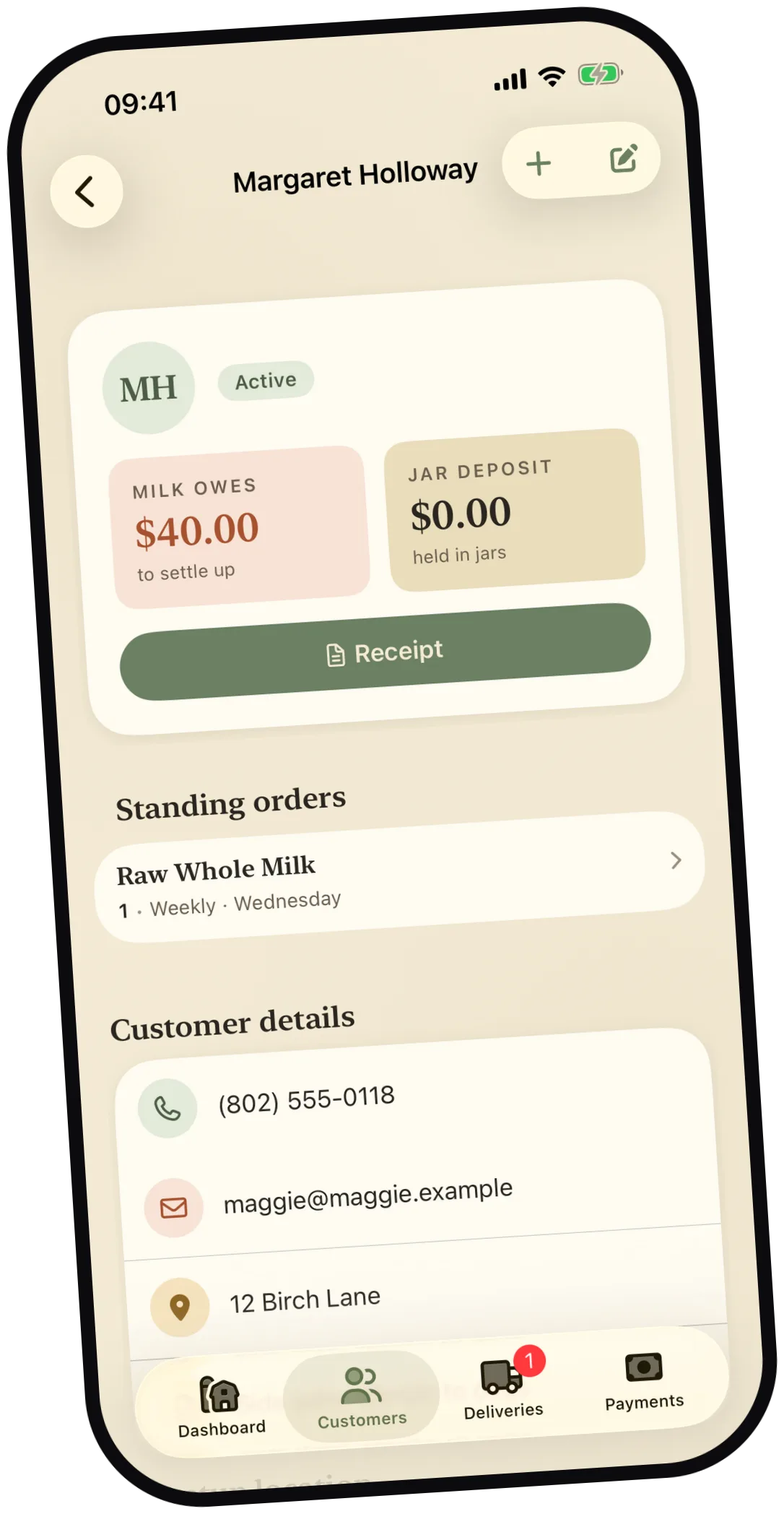
The balance is right there. Each customer’s page shows what they owe for milk, their jar deposit, and their standing orders.

Milk Jar chat with a customer showing a delivery request card, a meetup proposal card, and a smart suggestion chip Milk Jar customer detail showing milk owed, jar deposit, and standing orders

Getting started

Setup takes three steps.

You already know everything Milk Jar needs: what you sell, who buys it, and which days you deliver.

  1. 01

    Add your dairy

    Enter your dairy’s name, what you sell and for how much, and the deposit you charge on jars.

  2. 02

    Add your customers

    Give each customer a standing order, weekly or every other week. Milk Jar fills in the route from there.

  3. 03

    Make your deliveries

    Work down today’s list and record each stop as you go. Balances and jar counts are up to date by the time you’re home.

For you and your customers

One app for the dairy and its customers.

You run the route in Milk Jar. Your customers can use the same app to see what’s coming and what they owe, and they only ever see their own account.

For dairy operators Illustrated wooden milk crate

What the dairy gets

  • Today’s route and quick delivery entry
  • Customer schedules, balances, and receipts
  • Chat with one customer, or message everyone at once
  • Revenue, volume, missed-delivery, and jar reports
For dairy customers A happy illustrated cow

What your customers get

  • Upcoming deliveries and reminders they can answer
  • Request a delivery by picking a product and a day
  • Suggest a meetup spot on the map
  • Balance, payments, and delivery history

Customer access is included with Milk Jar Pro.

iPhone and Android

Works on iPhone and Android.

Milk Jar is built separately for each phone, and the two versions work the same way. You can carry an iPhone while your driver uses an Android, and with Pro you both see the same records.

Native appMilk Jar for iPhone Coming soon
Native appMilk Jar for Android Coming soon

Store links will go here once the apps are approved. If you’d like to try it before then, email us.

Milk Jar Pro

Pro connects your customers and your helpers.

The customer app, sync between devices, and sign-ins for family or a driver.

See pricing

Pricing

Try it free with three customers.

You buy everything inside the app. There are no contracts and no per-customer fees, and these three options are the whole price list.

Free

$0 forever

Every local feature, for up to three customers.

  • Up to 3 customers
  • Route, jars, payments, and reports
  • PDF receipts and CSV exports
  • No account required

Good for deciding whether Milk Jar fits your route.

Lifetime unlock

$12.99 once

Pay once for unlimited customers on one phone.

  • Unlimited customers
  • Every local feature, permanently
  • Works completely offline
  • No subscription, no account

Good for a one-person route that lives on one phone.

Milk Jar Pro

$3.99 a month, or $39.99 a year

Adds sync, the customer app, and team sign-ins.

  • Everything in the lifetime unlock
  • Sync across phones and tablets
  • Customer app: chat, requests, reminders
  • Team sign-ins for family or a driver

After three paid months the local features stay unlocked, even if you cancel.

Feature comparison of Milk Jar plans
Feature Free Lifetime Pro
Customers 3 Unlimited Unlimited
Deliveries, jars & payments
Reports & CSV exports
PDF receipts
Works offline
Sync across devices — —
Customer app & chat — —
Delivery reminders — —
Team sign-ins — —
Price $0 $12.99 once $3.99/mo · $39.99/yr

Prices are in USD and billed through the App Store, or Google Play once the Android app ships. You can export your data to CSV on any plan, including Free.